
CorrectPhoto Digital Photo Editor3.2.3 - Download
You'll be able to download in few seconds.
Publisher Description
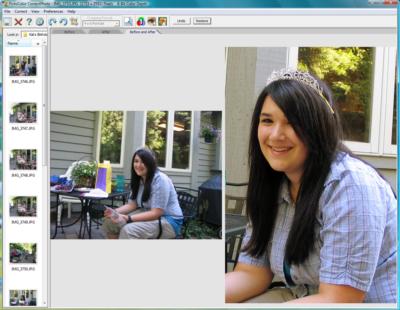
Make great photos with CorrectPhoto-The Digital Photo Editing Software that is Fun and Easy to Use. CorrectPhoto features OneClick color correction technology and AutoRez crop to fit for exceptional high res prints and HDTV photos . CorrectPhoto is the photo editor for anyone who wants their photos to look great but does not want to learn complicated editing software. Create great photos for Ebay, Facebook, Flickr, MySpace, selling real estate, or for family and friends.
Designed to work with Windows XP and Vista CorrectPhoto is all you will need to turn your average photos into great pictures you will be proud to share with others. Within seconds you can rotate, crop to size and with a single click you will give the picture the color of life. The Red Eye removal technology with zoom feature gets rid of the red eye in any picture. Use the sharpening tool to give your photo print the crispness you want. Resize for emailing, web site or any photo application. And, order prints online with a click.
OneClick Color Correction: CorrectPhoto takes the guess work out of color correction. CorrectPhoto features iCorrect OneClick, PictoColor's award winning point-and-click color correction technology that really works. OneClick automatically corrects the white balance, exposure, and saturation with one click! The most difficult and time consuming digital photo editing task is correcting the color. It is difficult because the tools in other photo editors are difficult to understand and use. Not so with CorrectPhoto. With CorrectPhoto's OneClick technology you can fix the color with a single click. Create stunning black and white and sepia tone photos with a single click.
AutoRez crop to fit with PictoColor's No Loss Resolution Technology. Crop to size for print, email, HDTV, website, scrapbook, eBay, Facebook, Flickr.
Designed for Windows XP and Vista users, CorrectPhoto let's you access and manage photos with ease with its built in Windows Explorer.
About CorrectPhoto Digital Photo Editor
This Editors program is available in English. It was last updated on 29 September, 2026. CorrectPhoto Digital Photo Editor is compatible with the following operating systems: Windows.
The company that develops CorrectPhoto Digital Photo Editor is PictoColor Corporation. The latest version released by its developer is 3.2.3.
The download we have available for CorrectPhoto Digital Photo Editor has a file size of 4.2 MB. Just click the green Download button above to start the downloading process. The program is listed on our website since 2009-03-23 and was downloaded 0 times. We have already checked if the download link is safe, however for your own protection we recommend that you scan the downloaded software with your antivirus. Your antivirus may detect the CorrectPhoto Digital Photo Editor as malware if the download link is broken.
How to install CorrectPhoto Digital Photo Editor on your Windows device:
- Click on the Download button on our website. This will start the download from the website of the developer.
- Once the CorrectPhoto Digital Photo Editor is downloaded click on it to start the setup process (assuming you are on a desktop computer).
- When the installation is finished you should be able to see and run the program.
Program Details
System requirements
Download information
Pricing
Version History
version 3.2.3
posted on 2009-03-23
New Croping formats, new website, RegNow Affiliate Certification, Updated descriptions
version 1.0
posted on 2004-05-17
New Product
Disclaimer
External Download
We do not host CorrectPhoto Digital Photo Editor on our servers. We did not scan it for viruses, adware, spyware or other type of malware. This app is hosted by the software publisher and passed their terms and conditions to be listed there. We recommend caution when installing it.
The external download link for CorrectPhoto Digital Photo Editor is provided to you by apps112.com without any warranties, representations or guarantees of any kind, so access it at your own risk.
If you have questions regarding this particular app contact the publisher directly. For questions about the functionalities of apps112.com contact us.
